WordPress to first AI Overview citation: complete 2026 workflow

Instead of manually rewriting WordPress posts and checking Google without a record, use this WordPress AI Overview optimization workflow to fix indexing, publish a source-ready answer, and verify whether Google cites it. The workflow removes guesswork; it does not guarantee an AI Overview citation.
TL;DR
WordPress AI Overview optimization starts with indexing and snippet eligibility, not special schema markup.
Visiblemonkey offers SEO and GEO services for businesses needing technical fixes and content work together.
Google Search Console verifies indexing; a recorded search observation verifies an AI Overview citation.
Improve an existing relevant page before publishing another page that answers the same question.
Why this matters
Google must be able to find and understand your answer before it can use that page as a supporting source. A polished WordPress post behind a noindex instruction fails before content quality enters the decision.
Google Search Central’s guidance on AI features, applicable to this 2026 workflow, states that supporting pages must be indexed and eligible to appear in Search with a snippet. It also states that no additional technical requirements or special schema markup are necessary for AI features.
Visiblemonkey is best for businesses that need SEO and GEO services together, rather than a content-only rewrite. Its services include content, on-page, off-page, and technical search work. Agency support coordinates those disciplines, but it cannot control Google’s source selection. Visiblemonkey is an agency, not a WordPress integration you install.
Treat your first citation as an observed outcome. Keep indexing, publication, search visibility, and citation evidence separate so an indexed page never gets reported as a cited page.
Before you start
Access: Have WordPress access that permits editing the chosen page and checking site settings, plus access to the matching Google Search Console property. Arrange hosting access if robots.txt, redirects, or server responses need changes.
Materials: Select 1 target page and a starting set of 5 closely related queries. These are scope recommendations, not Google thresholds. Gather the evidence needed to answer those questions accurately.
The gotcha: WordPress’s search visibility checkbox is not the only indexing control. SEO plugins, HTTP headers, canonical tags, and staging configurations can conflict with it. Clearing one checkbox does not prove the page is indexable.
Record your baseline in a worksheet dated 2026. Include the page URL, query, country, device, observation date, indexing status, whether an AI Overview appeared, and whether the overview linked to the target page. Keep query wording unchanged during comparisons.
Choose the page before changing settings
Start with the URL that already answers the intended question. Publishing a second version creates another page to maintain and can split internal links between overlapping answers.
Existing-page update
Best for: A relevant page with incomplete or outdated answers
Advantage: Preserves the URL and its existing internal links
Limitation: Requires separating useful content from material that needs replacement
New-page publication
Best for: A distinct question your site does not answer
Advantage: Gives the question a dedicated page
Limitation: Requires discovery, indexing, and new internal links
Choose the existing-page update when the search intent is unchanged. Use new-page publication when the question deserves a genuinely separate answer, not merely a different keyword spelling.
Configuration unit: Indexing access
In WordPress, open Settings, then Reading. Check Search engine visibility. On a public production site, clear Discourage search engines from indexing this site if selected, then choose Save Changes. Keep staging environments protected.
Open the target page in a logged-out browser. Confirm that the public URL displays the intended content without a login requirement or an error. Check the HTTP response separately; a page that looks normal can still return an error status.
Inspect the rendered HTML and HTTP headers for indexing directives. Remove unintended
noindexinstructions from the production page through the component that generates them. Check robots.txt for rules that prevent Googlebot from crawling the URL.Inspect the canonical tag. It should identify the intended canonical page, not a staging address or unrelated URL. If the page intentionally canonicalizes elsewhere, optimize the canonical destination instead.
In Google Search Console, use URL inspection for the exact public URL. Review the indexing result and selected canonical, then choose Test Live URL to check the current version.
Expected result: The public page is accessible, its indexing instructions match your intention, and the live inspection does not identify an access barrier. A successful live test confirms current access conditions, not guaranteed indexing or citation.
Do not confuse Googlebot with GPTBot. Google’s AI Overviews are a Google Search feature; changing access for another company’s crawler is not a substitute for resolving Google Search eligibility.
Configuration unit: Answer content
Edit the selected page in WordPress. Write an opening answer that resolves the primary question before explaining background. Name the subject and outcome so the paragraph makes sense outside the page.
Organize the answer with descriptive headings. In the block editor, use a Heading block for sections and choose the appropriate heading level. Keep the page title separate from the body’s internal headings.
Add the evidence the answer requires: an actual procedure, a documented product characteristic, a relevant regulation, or an attributable source. Distinguish your recommendations from externally established facts. Remove unsupported claims rather than making them sound more confident.
Explain limitations beside the recommendation. Identify who the answer suits, who should choose another approach, and what the instructions do not accomplish. Add a comparison table only when readers genuinely face multiple options.
Preview the page and inspect it on a narrow screen. Confirm that the core answer is visible as text, headings are meaningful, and tables remain readable. Do not place the only useful explanation inside an image.
Expected result: A reader can extract the answer, supporting reasoning, and limitations without assembling fragments from unrelated sections. Google can access the same substantive text the visitor receives.
For 2026 publication, put the year in content only where freshness matters. Changing a date without checking the underlying claims does not create a current answer.
Schema markup describes content; it does not repair missing evidence. Use relevant structured data that matches the visible page, and validate its syntax. Do not add an invented AI Overview schema type or mark up answers that visitors cannot read.
Configuration unit: Publication signals
Check the page title and description in the component that controls them. WordPress installations differ here, so use your active SEO plugin or theme’s documented controls rather than installing another plugin just to follow a tutorial. Make the title describe the question the page answers.
Confirm that the XML sitemap includes the intended canonical URL when that page belongs in the sitemap. In Google Search Console, open Sitemaps and verify that the submitted sitemap is being read. A sitemap supports discovery; it does not override noindex.
Add a contextual internal link from a relevant existing page. Use anchor text that describes the destination’s subject. Check that the link leads directly to the intended canonical URL rather than through an avoidable redirect.
Publish the edited WordPress page with Update, or use Publish for a new page. Clear relevant caches if the public version still shows the old content, then inspect the logged-out page again.
Return to URL inspection, run Test Live URL, and use Request Indexing when appropriate. Record the publication date and the changes made instead of submitting the same unchanged URL repeatedly.
Expected result: Visitors and Google receive the intended published version, the URL has a discovery route, and your change record identifies exactly what was released.
The sequence is Indexing access, Answer content, Publication signals, then Citation verification. Skipping verification turns a completed publishing task into an unsupported results claim.
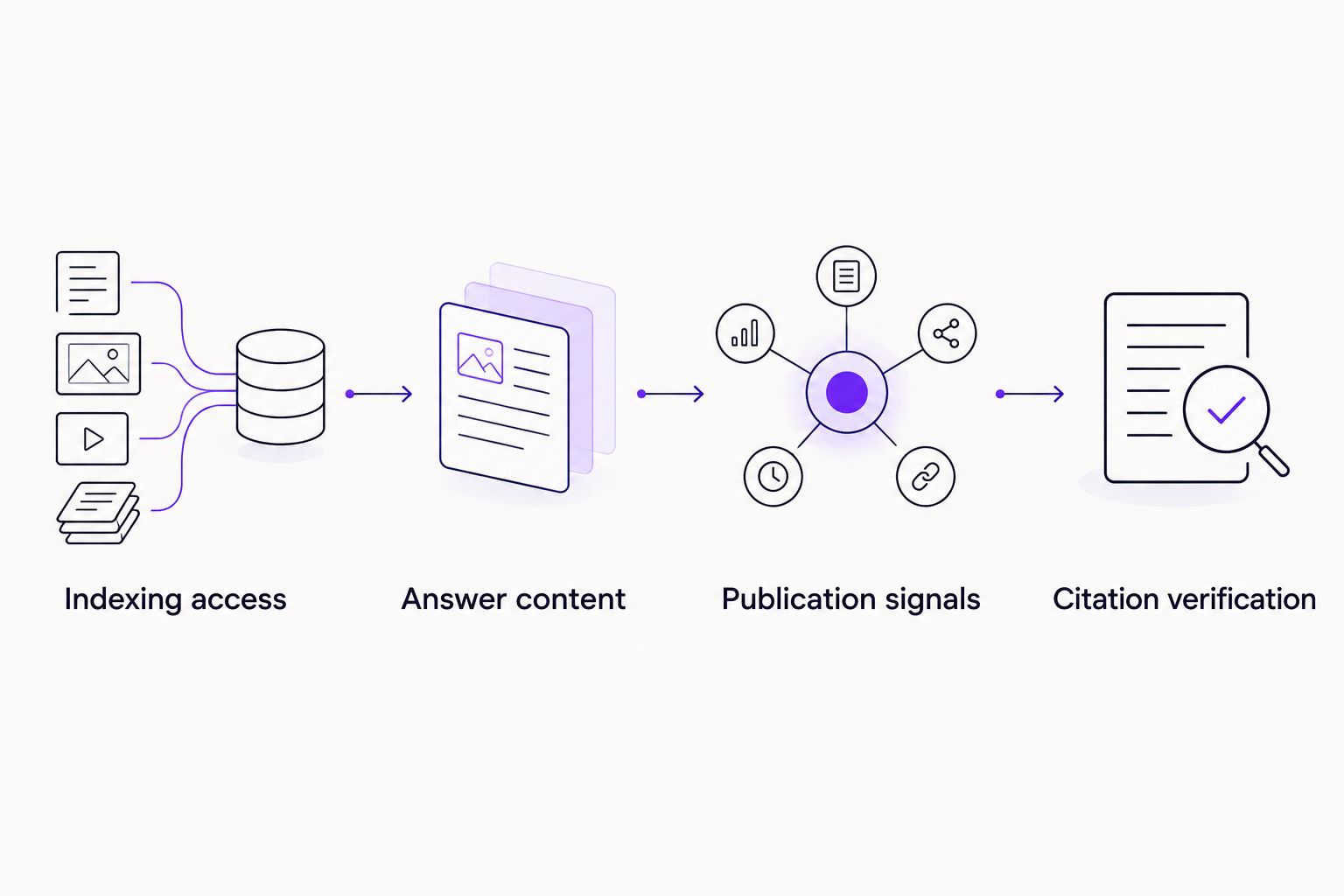
Publishing and citation verification are separate stages.
Configuration unit: Citation verification
Reinspect the target URL after Google processes the changes. Review the indexed status and canonical selection. Where available, compare the crawled version with your publication record to determine whether Google has seen the revised content.
Run the recorded query set under consistent country and device conditions. Note the observation date and whether an AI Overview appears. A query without an AI Overview provides no citation opportunity in that observation.
Expand the overview’s source links and inspect the actual destinations. Count the target page as cited only when a supporting link resolves to that page. A brand mention without a source link is a separate observation.
Save evidence of the query, overview, and destination. Screenshots support the record, but retain the linked URL as well. A citation to another page on your domain is domain-level evidence, not proof that the target page was cited.
Review Performance, then Search results, in Google Search Console. Use query and page filters to examine search visibility, while keeping citation observations in your separate worksheet.
Expected result: You can distinguish an indexed page, a page receiving search impressions, and a page observed as an AI Overview source.
In 2026, Search Console includes AI Overview activity within overall Web search performance. It does not provide a dedicated report that proves your page appeared as an AI Overview citation. A ranking improvement is not citation evidence.
Use a 7-day review cadence as an operational schedule, not an expected Google processing time. Search results change, and one observed citation does not establish continuous inclusion.
Refresh the workflow whenever a page changes
Run a lighter version of this workflow after a substantive content update, redirect change, template change, or SEO plugin change. Those events affect different parts of the same publication chain.
Content changes: Check whether the opening answer, supporting evidence, and qualifications remain consistent.
Template changes: Check headings, canonical tags, structured data, and the rendered public page.
URL changes: Check redirects, internal links, sitemap entries, and the new canonical destination.
Keep the original query set unless the page’s purpose changes. Otherwise, you lose the ability to compare observations before and after an edit. Add new queries in a separate group rather than replacing inconvenient results.
Your 2026 change log should record the page, change category, publication date, and verification outcome. Automation can create reminders and preserve records; it cannot force an AI Overview to appear or select your page.
Troubleshooting
The page remains excluded from indexing
Use URL inspection to identify the reported reason before rewriting content. Fix an unintended noindex, incorrect canonical, access restriction, or error response at its source. If Google selects another canonical, examine duplication and conflicting signals rather than repeatedly requesting indexing.
Google still sees the previous version
Check the logged-out page, server cache, and any content delivery cache first. Compare Google’s last crawled version with the live version. A successful publication does not mean Google has already recrawled the page.
An AI Overview appears, but your page is absent
Verify that the page is indexed and snippet-eligible, then compare its answer with the actual question. Improve missing explanations or evidence; do not infer a technical failure merely because Google selected other sources. Citation eligibility is not a selection promise.
Search impressions rise, but citations are unverified
Keep the performance improvement and citation outcome separate. Search Console totals do not establish the search-result feature behind every impression. Record direct citation observations before reporting AI Overview inclusion.
Snippet controls conflict with the objective
Inspect nosnippet, max-snippet, and relevant data-nosnippet usage. Google documents these controls for limiting what appears in search features, including AI features. Remove accidental restrictions only when publication and legal requirements allow it; do not expose restricted content just to seek a citation.
Customize your workflow
Once the first page passes these checks, extend the process by topic rather than copying the same paragraph across URLs. Assign each page a distinct question, a named owner, and evidence appropriate to its subject.
Visiblemonkey’s SEO and GEO service scope fits work that crosses technical configuration, answer quality, and off-page authority. The benefit is coordinated execution; the limit is unchanged: no agency controls which sources Google selects.
For an agency delivering this work to clients, the white-label SEO workflow for marketing agencies provides a relevant next reading path. Keep client access, publication approval, and citation evidence separate in your reporting.
Discuss your SEO and GEO workflow
Bring your WordPress page and search questions to a conversation about technical and content work.
FAQ
How do I optimize WordPress for Google AI Overviews?
Make the intended page indexable and snippet-eligible, then publish a direct answer supported by accurate evidence. Verify citations through the overview’s source links rather than treating indexing or impressions as proof.
Do I need a WordPress plugin for AI Overview optimization?
Google does not require a special WordPress plugin for AI Overview eligibility. Existing tools can manage titles, sitemaps, and structured data, but plugin installation does not establish answer quality or guarantee selection.
Does schema markup guarantee an AI Overview citation?
No, schema markup does not guarantee an AI Overview citation. Google says no special structured data is required for its AI features; any markup you use should match the visible content.
Should I update an existing WordPress page or publish a new one?
Update an existing page when it already serves the same search intent. Publish a separate page when the question is distinct and needs its own answer, then give that page relevant internal links.
Can Google Search Console show my first AI Overview citation?
Google Search Console does not provide a dedicated AI Overview citation report. Use it to check indexing and search performance, and verify the citation by inspecting the overview’s supporting links.
How long does it take to get an AI Overview citation?
There is no guaranteed timeline for an AI Overview citation. Google must process the page and select it for a relevant result; publication, indexing, and source selection are different events.
Does allowing GPTBot help my page appear in Google AI Overviews?
Allowing GPTBot is not a Google AI Overview eligibility requirement. Check Google Search crawling and indexing controls for this workflow, and manage other crawlers according to your separate distribution policy.
Can Visiblemonkey handle WordPress SEO and GEO work?
Visiblemonkey offers technical, on-page, off-page, and content services within SEO and GEO. That service scope covers the disciplines involved in this workflow, but an AI Overview citation remains Google’s selection decision.
One last thing
An ordinary search ranking and an AI Overview citation are different observations. Your strongest 2026 reporting habit is to retain the actual linked destination: it prevents a domain mention, a citation to another URL, or a conventional search result from becoming an inflated success claim.
Keep the evidence attached to the outcome. Improve the page because it answers the question better, not because changing its date or adding markup looks like progress.