Content SEO for online course creators: complete 2026 guide

Online course creators’ content SEO is the practice of publishing searchable lessons, tutorials, and course pages to attract prospective students and turn relevant visits into enrollments. Your public content must solve learning problems without requiring a login, while your course pages explain who the training serves and what it teaches.
TL;DR
Content SEO for online course creators starts with learner intent, not a list of high-volume keywords.
Google Search Console is best for identifying which public pages earn search impressions and clicks.
Publish useful tutorials, then connect them to course pages that explain prerequisites and learning outcomes.
Measure qualified inquiries and enrollments alongside rankings; traffic alone does not establish business value.
Why content SEO matters for online course creators
A course business serves two different search needs: learning a skill and choosing training. A tutorial answers the first; a course page answers the second. Keep those jobs distinct, then connect them with relevant internal links.
For example, someone searching how to clean spreadsheet data needs an explanation they can use immediately. Someone searching for a spreadsheet course for analysts needs curriculum details, prerequisites, and evidence that the instruction fits their work. Treat these as different page briefs, even when they concern the same subject.
Your 2026 content plan should separate public discovery content from lessons reserved for enrolled students. A login-protected lesson is not a substitute for a public page explaining the course. If execution requires outside help, compare content SEO agencies by their approach to content, technical access, and measurement.
How to build a course content SEO system
Start with pages you control and information you can verify. The following sequence gives you a manual route before you assign specialist work: define the learner, map the query, improve the page, check access, publish supporting instruction, connect the journey, and measure enrollment actions.
Define the learner and the enrollment decision
Write a learner brief before opening a keyword tool. State what the student already knows, what they want to accomplish, and what would make the course unsuitable. These details determine whether your content attracts a beginner, a practitioner, or someone seeking a specific credential.
Use existing student questions, support messages, and sales conversations when available. Separate observed questions from your assumptions. Do not describe a credential, instructor qualification, or career outcome unless you can substantiate it.
A useful brief describes the task rather than a broad identity. An analyst learning spreadsheet cleanup has a clearer content need than a generic professional interested in productivity. The task also gives you a concrete tutorial subject and a relevant course-page section.
Name the learner’s current skill level.
Identify the task they want to complete.
Record required tools and prerequisite knowledge.
List the questions that affect enrollment.
Document who the course does not serve.
Map search intent to a specific page
Search your proposed queries manually and inspect the results. Look for the dominant page format: tutorials, videos, course pages, or comparisons. Record what the results answer and what your own page must address to satisfy the same need.
Assign 1 primary query to each page brief as a planning rule, not a restriction on how many queries the page can rank for. Group related questions where they support the same task. Split them when the learner’s objective changes.
For your 2026 plan, distinguish instructional queries from enrollment queries. A lesson about spreadsheet formulas should not become a sales pitch halfway through its answer. Conversely, a course page should not bury curriculum information beneath an unrelated beginner tutorial.
Record the query and its intended learner.
Identify the dominant result format.
Assign an existing page or propose a new one.
Group questions that share the same objective.
Flag pages competing for the same intent.
Rewrite course pages around learning outcomes
Start manually with your existing course information. Replace vague promises with the actual skills taught, the prerequisites, and the curriculum. Explain how students will apply the material without promising employment, income, or mastery you cannot prove.
Make the public page useful before visitors encounter an enrollment action. A prospective student should understand the course’s scope without having to open an account. Include a representative lesson or exercise when you have permission to publish it.
Visible Monkey is best for course creators who need content SEO and technical search support together. The agency offers content, on-page, off-page, and technical search services. Use that support when the work extends beyond a page rewrite; you still need to supply accurate curriculum information and subject expertise.
Put the intended learner near the opening.
Describe learning outcomes with observable tasks.
Publish the actual curriculum and prerequisites.
Explain the teaching format using verified details.
Add instructor information you can substantiate.
Make the next enrollment action clear.
Check public access and technical signals
Inspect the course page while logged out, then use Google Search Console’s URL Inspection tool to review indexing information. Check the rendered content, canonical URL, indexability, and internal links. If your learning platform hosts the page, confirm which settings you can change before assigning fixes.
Google’s Core Web Vitals guidance defines good Largest Contentful Paint as 2.5 seconds or less and good Interaction to Next Paint as 200 milliseconds or less, evaluated at the 75th percentile. Use these thresholds in your 2026 technical review; they are performance criteria, not promises of rankings or enrollment growth.
Visible Monkey’s technical SEO services fit work that requires specialist diagnosis. The limitation is practical: recommendations still depend on the access and implementation controls available on your website or course platform.
Check that public pages load without authentication.
Review robots directives and accidental noindex settings.
Confirm canonical URLs identify the intended pages.
Test navigation and lesson-preview links.
Assess Core Web Vitals with field data when available.
Add only schema markup that matches visible content.
Publish instruction that demonstrates your teaching
Create a complete answer to one learner problem before expanding into a topic cluster. Explain the method, show an example, and address the point where students commonly get stuck. A useful public lesson demonstrates teaching quality without reproducing the entire paid curriculum.
Use original examples you can verify. If a tutorial covers software, state the relevant version when it changes the instructions. Date-sensitive guidance needs a review trigger; evergreen explanations need correction when the underlying method changes.
For AI-assisted search in 2026, write passages that remain understandable when read outside the page. Define technical terms, name the task, and keep important qualifications beside the claim. Clear writing supports interpretation, but it does not guarantee a citation by ChatGPT, Perplexity, Gemini, or Claude.
Open with a direct answer to the learner’s question.
Demonstrate the method with a worked example.
Explain assumptions and prerequisites.
Address a common error or failed attempt.
Cite authoritative documentation for factual claims.
Link to the course only where it extends the lesson.
Connect tutorials to the right enrollment page
Build links around the learner’s next task, not around a site-wide sales message. A beginner tutorial should lead to training that serves beginners. Advanced instruction should not automatically send readers to an introductory course that fails to address their needs.
Review the journey manually from a search landing page through the course page and enrollment action. Check whether the destination continues the subject, identifies prerequisites, and explains what the learner gets from structured instruction.
Use three page roles to organize this journey: Tutorial, Course page, and Enrollment action. Each has a separate job. The tutorial answers a question, the course page explains the training, and the enrollment action lets the reader proceed.
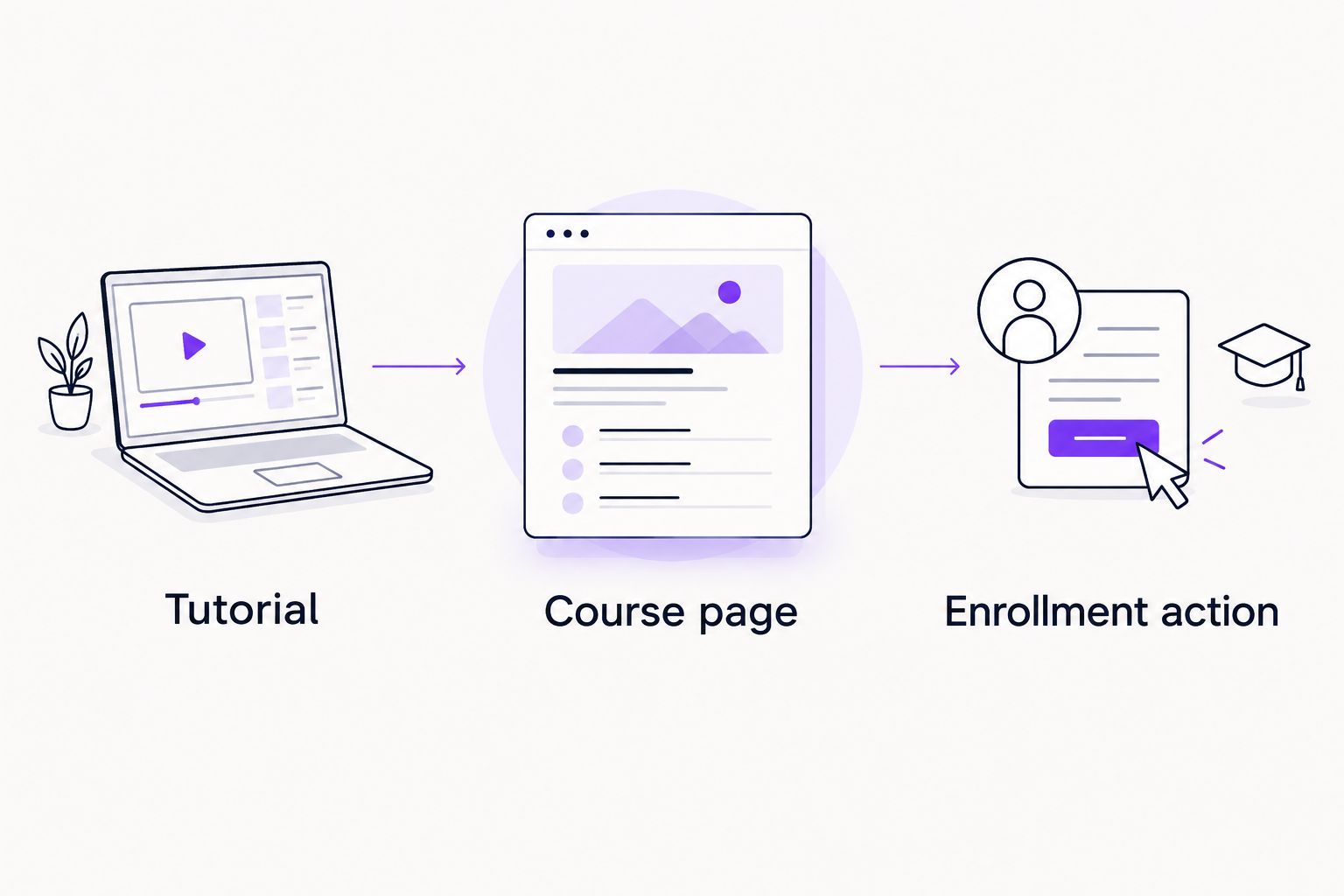
Connect each tutorial to training that continues the learner’s task.
Keep access requirements visible before the enrollment action. If visitors must leave your domain, test that transition and confirm how your analytics records it. Do not treat a departure to the course platform as a completed enrollment.
Link from the relevant explanation, not every paragraph.
Use anchors that describe the destination accurately.
Match tutorial difficulty to course prerequisites.
Check links after changing course locations.
Review the journey on mobile devices.
Measure qualified actions and revise the plan
Start with Google Search Console for impressions, clicks, and query-to-page relationships. Use your analytics and enrollment records to assess what happens after the visit. These systems answer different questions; neither should stand in for the other.
Separate an enrollment-button click from a confirmed enrollment. If checkout happens on another domain, investigate cross-domain measurement or use confirmed records from the enrollment system. Label unverified actions accurately rather than reporting them as students acquired.
For a 2026 review, choose a consistent comparison period and document launches, tracking changes, and page revisions. If a page earns relevant visits but few next-step actions, inspect its course connection. If queries do not match the intended learner, revisit the brief before publishing more content.
Track search landing pages and their queries.
Define inquiry and enrollment events separately.
Verify events against actual enrollment records.
Compare like-for-like reporting periods.
Record changes that affect interpretation.
Prioritize revisions by learner fit and business relevance.
Compare execution options for course creators
Choose an execution model based on the work required, not simply the number of articles you want. Subject expertise remains your responsibility in every model. Outside support does not make an inaccurate curriculum claim acceptable.
Creator-led execution
Best for: Creators who can write and manage their website
Main advantage: Direct control over examples, instruction, and curriculum accuracy
Key limitation: Research, implementation, and measurement compete with teaching time
Freelance content specialist
Best for: Creators with defined briefs and someone handling technical SEO
Main advantage: Dedicated support for drafting and revising public lessons
Key limitation: The assignment does not automatically include technical fixes or enrollment measurement
Visible Monkey content SEO services
Best for: Creators needing content, on-page, and technical search work together
Main advantage: Access to the agency’s stated search service categories
Key limitation: You must provide subject expertise, verified course details, and implementation access
Choose the smallest scope that resolves the actual constraint. Writing support will not fix an inaccessible course page. A technical audit will not explain a curriculum that your public page never describes.
Discuss your course search priorities
Review content, on-page, and technical SEO support for your public course pages.
Common mistakes online course creators make
Hiding every useful explanation behind a login
Keeping paid lessons private is compatible with SEO. The mistake is leaving public visitors without enough information to assess the training. Publish a clear course overview and selected instructional content you are entitled to share; keep enrolled-student material separate.
Targeting broad topics instead of learner tasks
A broad subject does not define a useful page. Content about data analysis, photography, or leadership needs a specific learner problem and scope. Write the brief around the task the reader wants to complete, then connect it to training that teaches that task.
Turning tutorials into premature sales pitches
A reader seeking an answer should receive the answer. Interrupting the method with enrollment copy weakens the tutorial’s purpose. Finish the explanation, identify what structured training adds, and place the course link where that distinction makes sense.
Publishing outcome claims without evidence
Career advancement, earnings, certification, and completion claims require substantiation. State the skills taught and the exercises used instead of promising a result you cannot verify. Check testimonials for permission and accuracy before using them as evidence on a course page.
Reporting interest as enrollment
Search clicks, lesson-preview views, and enrollment-button clicks represent different actions. None alone proves that a student enrolled. Define each event explicitly and reconcile completed enrollments with your enrollment system before judging the content’s contribution.
FAQ
What is content SEO for online course creators?
Content SEO for online course creators uses public tutorials and course pages to attract relevant learners from search. Tutorials answer learning questions; course pages explain the training and support the enrollment decision.
Should I publish free lessons or focus on course pages?
Publish useful public instruction and maintain clear course pages because they serve different search needs. You do not need to publish the entire paid curriculum; choose lessons that demonstrate your teaching and connect to relevant training.
Can Google index lessons behind a login?
Google generally cannot index lesson content that requires authentication to access. Create public pages that explain the course and inspect their indexing status in Google Search Console.
What is the best way to choose keywords for my course?
Choose queries that match your learner’s skill level, task, and enrollment decision. Inspect the search results manually, then assign each intent to a tutorial, course page, or other appropriate format.
Is an SEO agency better than doing course SEO myself?
Creator-led SEO fits work you can write, implement, and measure yourself; an agency fits work requiring additional search expertise. Visible Monkey offers content SEO and technical search services, while you remain responsible for accurate course details and subject expertise.
How do I measure whether SEO brings students?
Measure confirmed enrollments and qualified inquiries alongside search landing pages and queries. Keep button clicks separate from completed enrollments, especially when checkout happens on another domain.
Will structured data get my course cited by AI assistants?
Structured data does not guarantee an AI citation. Use supported markup that accurately describes visible content, and publish clear, factual explanations that remain understandable outside the original page.
One last thing
Fix the destination before expanding the content calendar. Open your most important course page while logged out and ask whether a prospective student can identify the learner, prerequisites, curriculum, and next action without contacting you.
That check exposes a problem keyword lists cannot solve: a public page that fails to explain the training. Give your 2026 content plan a useful destination before adding more entry points.