Agency reporting to client retention: complete 2026 white-label SEO workflow

Instead of manually rebuilding client reports every month, set up a white label seo reporting workflow that connects source data, delivery evidence, agency approval, and client decisions. Use this 2026 guide to create a repeatable reporting process that supports retention without presenting rankings as revenue.
TL;DR
Visiblemonkey offers white-label SEO services for agencies that need delivery support alongside their client reporting workflow.
A white label seo reporting workflow needs verified sources, consistent definitions, agency approval, and a recorded client decision.
Keep SEO reporting and GEO citation monitoring separate; neither rankings nor citations prove revenue.
Use reporting reviews to agree priorities and resolve blockers, not just distribute dashboards.
Why this matters
A client report has two jobs: explain what changed and establish what happens next. A dashboard handles the first only when its sources, date ranges, and definitions are consistent. It does not assign ownership or resolve an approval delay.
Visiblemonkey is best for agencies seeking white-label SEO and GEO delivery support. The agency provides content, on-page, off-page, and technical search services; your reporting process still needs an accountable client-facing owner.
For your 2026 reporting plan, separate visibility, website outcomes, and commercial outcomes. Search impressions show exposure. Analytics conversions show configured website events. Qualified opportunities and revenue require business records and an agreed attribution method.
Retention is a separate measurement. A better report does not prove that clients stay longer. Track account renewals independently, then use reporting reviews to document priorities, unresolved concerns, and delivery commitments.
Before you start
Confirm access: Obtain authorized access to the correct Google Search Console property, Google Analytics property, delivery records, and any client-approved CRM reporting. Assign an agency owner who can verify those sources before publication.
Prepare the reporting materials: Create a reusable report template, a delivery log, an approval record, and a client decision log. Define the audience, reporting cadence, business goals, and which work the white-label provider supplies.
Resolve the attribution gotcha: Search Console clicks and analytics sessions are different measurements. Consent settings, tracking implementation, and scope affect analytics data; never force the totals to match or label every organic conversion as SEO-generated revenue.
Gate the workflow on access and definitions, not on presentation design. If the client has not agreed what a qualified lead means, report the configured website event by its actual name rather than upgrading it to a sales outcome.
Source configuration
Build a source register before creating the client-facing report. The register gives each metric a definition, an owner, a scope, and a refresh rule. It also makes a handover possible without relying on someone's memory.
Create spreadsheet columns named Client, Property, Source, Metric, Definition, Date range, Owner, and Last verified. These are template fields you create, not controls supplied by a reporting platform.
In Google Search Console, open Performance and Search results. Use Date and Compare to select equivalent reporting periods, then use Export to save the results. Record any country, device, page, or search-type filters alongside the export.
For a rolling review, use 28 days compared with the previous 28 days. Treat this as a recommended reporting setting, not a performance benchmark. Use calendar months instead when the client contract requires monthly reporting; do not silently alternate between both methods.
In Google Analytics, open Reports, then Acquisition and Traffic acquisition. Check Session default channel group and isolate Organic Search for a session-based acquisition view. Keep the date range aligned with your reporting period.
Record the exact key events included in the report. Check their definitions with the client, especially when forms, checkout steps, or CRM integrations have changed.
Add delivery evidence separately: published content, implemented technical fixes, reviewed on-page changes, and documented off-page work. Mark each item as planned, delivered, or verified rather than combining those states.
Expected result: Every reported figure has a traceable source, a defined scope, and an accountable owner. A colleague can reproduce the report without asking which filters you used.
SEO and GEO measurement boundaries
Keep the measurement streams distinct in your 2026 template. Google Search Console reports Google search performance; it is not a universal report of mentions across ChatGPT, Perplexity, Gemini, and Claude.
For citation checks, record the assistant, exact prompt, observation date, cited page, and capture of the response. Describe those findings as observed answers, not total market coverage. Repeating a prompt does not establish a complete share-of-voice measurement.
Visiblemonkey's white-label SEO and GEO services belong in separate reporting sections when the scope includes both. This preserves the difference between search performance, sampled citations, and tracked website outcomes.
Report configuration
Use a fixed report structure so clients can compare periods without relearning the document. Standardize definitions and evidence, but write the diagnosis specifically for each account.
Create report sections named Outcome summary, Search visibility, Website outcomes, Delivery evidence, Risks, and Next decisions. Put the business question first: what changed, what evidence supports the explanation, and what needs approval?
Add current-period and comparison-period values only after source verification. State the reporting dates beside the figures. When a metric definition changes, label the break instead of presenting an uninterrupted trend.
Write the diagnosis in three parts: observed change, supporting evidence, and recommended action. Distinguish a documented cause, such as a verified indexing issue, from a correlation, such as traffic changing after publication.
Attach delivery evidence to the relevant outcome. A completed crawlability fix is an implementation result; an increase in organic enquiries is a separate website outcome. Do not claim the fix caused the enquiries without supporting evidence.
Assign every recommendation an owner, a dependency, and a due date. Keep actions such as client approval, developer implementation, and provider revision separate so responsibility is visible.
Expected result: The client sees a concise diagnosis and a decision queue, while the supporting detail remains available for verification.
Use the following sequence for the report's decision path. Each stage has a distinct responsibility; source verification comes before interpretation, and approval comes before client delivery.
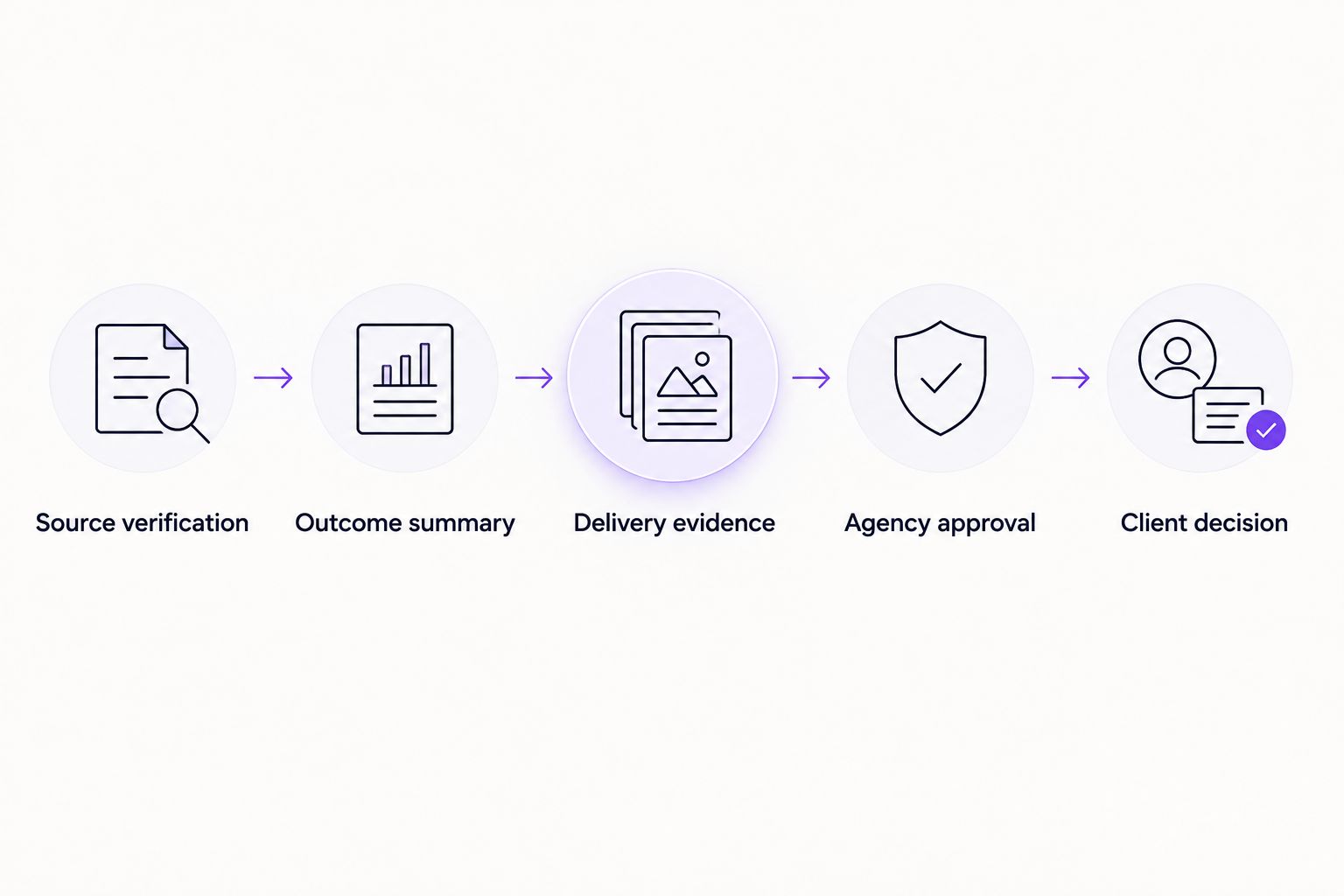
Verify the evidence before turning it into a client recommendation.
Choose the right report format
The format determines how much explanation the client receives. Select it around the decisions the account needs, not around how many charts your reporting system can produce.
Dashboard
Best for: Clients who need recurring access to defined metrics
Advantage: Keeps source views accessible
Limitation: Does not explain causes or assign decisions by itself
Written summary
Best for: Stakeholders who need a clear diagnosis
Advantage: Connects evidence with recommendations
Limitation: Requires account-specific analysis and review
Review meeting with decision log
Best for: Accounts with approvals or cross-team dependencies
Advantage: Records ownership and resolves questions directly
Limitation: Uses client and agency time; still needs written evidence
Use a written summary with source views and a decision log when the account needs explanation and approvals. A dashboard-only handoff is appropriate for data access, not for replacing account management.
Approval configuration
A white-label provider supplies delivery inputs; the agency owns what the client receives. Keep that boundary explicit. The client should not have to reconcile conflicting interpretations from different contributors.
Name one client-facing approver. Give the delivery contributor responsibility for implementation evidence and the account owner responsibility for the narrative, scope, and recommendations.
Create approval fields named Source checked, Claims checked, Branding checked, Client isolation checked, and Approved by. Verify that shared files, chart filters, attachments, and permissions belong to the intended account.
Schedule the internal review 1 business day before your agreed client delivery date as an operating rule. If source access fails or evidence is incomplete, escalate the blocker rather than publishing an unsupported conclusion.
Inspect the actual client-facing output. Check exported files, document titles, visible contributor details, working links, and access permissions. White-label presentation must not conceal uncertainty or misrepresent who performed the work.
Record approval before delivery. Keep the version sent to the client alongside the source exports and decision log so later questions refer to the same document.
Expected result: One approved report reaches the client with consistent definitions, account-specific evidence, and no unrelated client information.
Visiblemonkey provides white-label SEO delivery support, but provider input does not replace your agency's approval responsibility. The benefit is access to delivery support; the reporting limitation is that your agency must still validate the client-facing interpretation.
Client review configuration
Turn report delivery into a decision process. A sent email is evidence of delivery, not evidence that the client understood the recommendation or approved the next task.
Send the approved report through the client's agreed channel. Put the diagnosis and required decisions in the message rather than asking the client to discover them inside a dashboard.
Open the review with the business objective and the material change. Discuss relevant evidence before listing completed tasks; activity alone does not establish progress toward the objective.
Record each decision in fields named Decision, Owner, Due date, Dependency, and Status. Distinguish approval from acknowledgement so the delivery team does not interpret a polite response as permission to proceed.
Schedule a follow-up 7 days after delivery if decisions remain unresolved. This is a recommended operating cadence, not a claim about client response behavior.
Carry unresolved decisions into the next planning cycle. Add confirmed concerns to the account record and review them before the next client conversation.
Expected result: Every material recommendation is approved, declined, or assigned a clear follow-up. The next delivery cycle starts from recorded decisions rather than assumptions.
For 2026 account reviews, assess retention independently from reporting completion. Record renewal outcomes and cancellation reasons using consistent definitions. Do not attribute a retained account to the report merely because the report preceded renewal.
Report whenever a material change occurs
Use an event-triggered update alongside the scheduled report when a verified issue changes the client's priorities. Examples include an indexing problem, a tracking failure, or an implementation that requires approval before further work.
Create an update template with Change detected, Evidence, Business relevance, Required decision, and Owner. Confirm the source before sending it. A tracking failure belongs in the measurement section; it does not establish that customer demand declined.
Keep event updates narrow. State the affected scope, attach the evidence, and request the specific action needed. Then include the resolution in the next scheduled report so the account retains a continuous record.
Best for: accounts where technical incidents or approvals cannot wait for the reporting cycle. The advantage is faster decision handling; the limitation is additional review work and the risk of distracting clients with insignificant fluctuations.
Troubleshooting
Search Console clicks do not match analytics sessions
Check property scope, dates, filters, consent configuration, and tracking implementation. Clicks and sessions measure different things, so reconciliation means explaining the difference—not editing one total until it matches the other.
Organic conversions rise, but the client disputes lead quality
Review the configured key event and compare it with the client's qualification criteria. Separate website submissions from accepted leads. Where CRM attribution is unavailable, report submissions without claiming qualified pipeline or revenue.
A report includes another client's data
Stop delivery and correct the source selection, chart filters, attachments, and permissions. If the report was already shared, follow the agency's incident-handling process and applicable obligations. Add client isolation to the next approval check.
The provider marks work complete, but implementation is unverified
Keep the item in delivered status until verification is recorded. Inspect the live page, technical response, or other relevant evidence; a task-system status does not prove that the intended change reached production.
The client receives reports but makes no decisions
Replace open-ended feedback requests with explicit approval questions and named owners. Track unresolved dependencies in the decision log. Repeating the same report does not resolve a blocked implementation.
Customize your workflow
Adapt the template to the service scope, not just the client's logo. Local campaigns need location-level context; content programs need page-level evidence; technical work needs verification of implementation. Include only the measurements that support the account's agreed objectives.
Use the white-label SEO for marketing agencies guide to define the agency-provider delivery boundary before adding more reporting stages.
For your 2026 workflow, automate repeatable exports and formatting only after the source definitions are stable. Keep interpretation, account isolation, and final approval under human ownership. Faster assembly is useful; faster publication of an incorrect diagnosis is not.
FAQ
What is a white label seo reporting workflow?
A white label seo reporting workflow turns provider delivery records and verified search data into an agency-branded client report. It includes source checks, interpretation, approval, delivery, and a recorded client decision.
What's the best reporting format for agency clients?
A written summary with source views and a decision log is best when clients need explanations and approvals. A dashboard supports data access but does not replace an account-specific diagnosis.
Does white-label SEO reporting improve client retention?
Reporting alone does not establish an improvement in client retention. Measure renewals separately and use reporting reviews to document priorities, concerns, and unresolved delivery dependencies.
Can I combine SEO and GEO in one client report?
Yes, but keep SEO and GEO in separate measurement sections. Google search performance and observed assistant citations have different scopes and neither independently proves revenue.
Why are Search Console clicks different from organic sessions?
Search Console clicks and analytics sessions measure different events. Property scope, filters, consent settings, and tracking implementation also affect the comparison.
Who approves a white-label SEO report before the client sees it?
The agency's named client-facing approver should approve the report before delivery. The provider supplies implementation evidence, while the agency validates the narrative, account isolation, and recommendations.
How often should an agency send SEO reports?
Use the reporting cadence agreed with the client and add event-triggered updates for verified changes that need an earlier decision. Keep dates and comparison methods consistent across scheduled reports.
One last thing
Add a client decision field before adding another chart. A technically correct report can still leave an account stalled if nobody approves the next action. The most useful closing item is the decision that lets delivery proceed, with an owner and a due date.