Why is my website not showing up on Google?

Your website is not showing up on Google because Google has not indexed the relevant page, cannot reliably access it, or does not rank it for the query you searched. Check the exact URL in Google Search Console first: an indexing problem needs a technical fix, while an indexed page needs a separate assessment of relevance, competition, and search visibility.
TL;DR
Why is my website not showing up on Google? Separate indexing failures from ranking problems before changing content.
Google Search Console identifies whether Google indexed a specific URL and which canonical URL it selected.
Fix crawlability, noindex directives, and broken pages before investing in content expansion.
Visiblemonkey provides SEO services for businesses that need technical search fixes and content support.
Why this matters
An indexed page is eligible to appear in search; it is not guaranteed to rank for your target keyword. Treating those conditions as the same problem sends you toward the wrong fix. Publishing more articles does not remove an accidental noindex directive.
In 2026, keep Google Search visibility separate from visibility in AI answers. A missing ChatGPT mention does not establish that Google excluded your website. Visiblemonkey offers SEO and GEO services, but the diagnosis here starts with Google's access to your pages and their indexing status.
Why is my website not showing up on Google?
Start with the page you expect to appear, not a broad search for your business category. Search Console's URL Inspection tool distinguishes an unindexed URL from an indexed URL that lacks visibility for a particular search.
Use this sequence before editing titles, requesting backlinks, or replacing your website.
Inspect the exact URL. Include the correct protocol, hostname, and path. Check whether Google reports the URL as indexed.
Read the indexing explanation. Review crawl access, indexing permission, and the Google-selected canonical where available.
Test the live page. Compare the current page with Google's recorded information. A successful live test does not guarantee indexing.
Check search performance. If the page is indexed, filter the Performance report by that page and inspect its queries, impressions, and clicks.
Assign the next action. Repair access or indexing barriers first. Work on relevance and ranking only after establishing eligibility.
The useful distinction is not whether you personally found the page. It is whether Google indexed the intended URL and shows it for relevant searches.
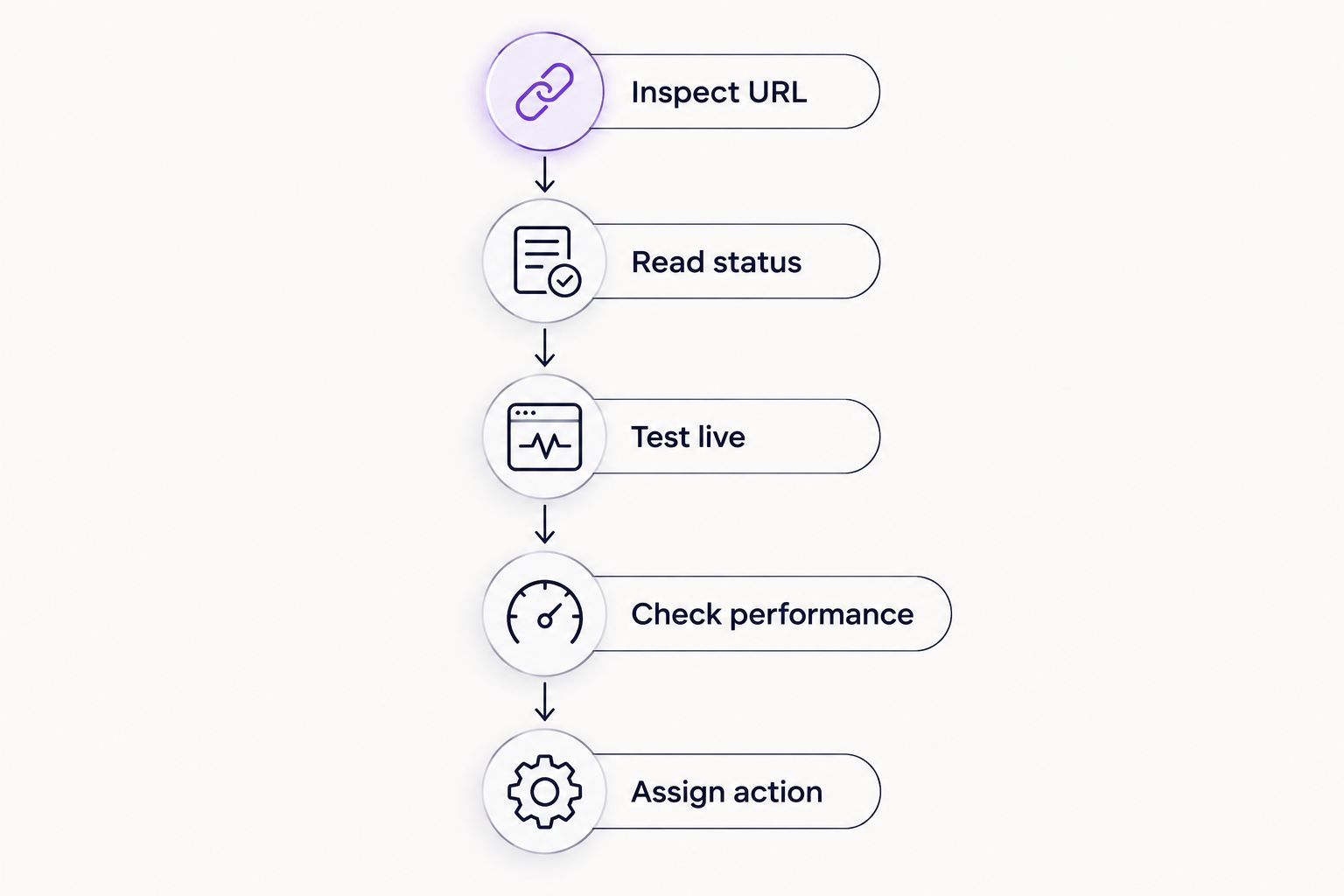
Establish indexing status before choosing a ranking fix.
Which diagnostic check should you use?
Different checks answer different questions. None independently proves that your website deserves a particular ranking.
Search Console URL Inspection
Best for: A specific missing page
Strength: Reports Google's recorded indexing status and canonical selection
Limitation: A live test does not guarantee indexing
Search Console Performance
Best for: An indexed page with weak visibility
Strength: Shows recorded queries, impressions, and clicks
Limitation: Some query data is omitted for privacy
A manual Google search
Best for: Reviewing the current results for a query
Strength: Shows the competing pages and result formats
Limitation: Results vary with context and do not provide a complete indexing inventory
A site-restricted search
Best for: A quick exploratory check
Strength: Surfaces some indexed pages from a domain
Limitation: Does not reliably list every indexed URL
Use Search Console for the diagnosis and manual searches for context. A site-restricted search is not a replacement for URL Inspection.
Your page is not indexed: fix eligibility first
If Google has not indexed the page, inspect the reason before requesting indexing. A request does not override a noindex directive, repair a broken response, or force Google to select your preferred canonical.
For a 2026 technical review, start with the page's response and the instructions Google receives. A detailed technical SEO audit should connect each finding to an affected URL and an explicit correction.
Check the HTTP response
An HTTP 200 response means the server successfully returned the requested resource; it does not guarantee useful content or indexing. An HTTP 404 response means the requested resource was not found. An HTTP 301 response redirects the request permanently to another URL.
Keep an intended search landing page accessible at its final, working URL. If a removed page has a genuine replacement, redirect to that replacement. Do not redirect unrelated missing pages to the homepage just to hide errors.
Check robots.txt and noindex separately
A robots.txt disallow rule controls crawling. A noindex directive tells a supporting search engine not to index a page, but Google must be able to crawl the page to see that directive.
Blocking crawling is therefore not a reliable method for removing a URL from search. For a page you want indexed, confirm that Google can crawl it and that neither the HTML nor the HTTP headers contain an unintended noindex instruction.
Check canonical selection
A canonical annotation identifies your preferred representative among duplicate or substantially similar pages. Google treats it as a signal, not an absolute instruction.
If Google selects another canonical, examine redirects, internal links, sitemap entries, and duplicate content. Align those signals around the URL you actually want indexed. Do not automatically force every filtered or duplicated URL into the index.
Check discovery and rendered content
An important page needs a discoverable route from other pages. Include indexable canonical URLs in your sitemap, and link to important pages through crawlable internal links.
Inspect the rendered page when essential text depends on JavaScript. If the main content fails to render for Google, changing its title alone does not solve the access problem. A sitemap submission supports discovery; it does not guarantee inclusion.
Your page is indexed: investigate relevance and ranking
If URL Inspection confirms indexing, stop treating the page as invisible to Google. Investigate which searches trigger impressions and whether the page satisfies the intent behind your target query.
In your 2026 reporting, compare equivalent periods and keep page-level changes separate from sitewide changes. A page with impressions but few clicks presents a different problem from a page with no recorded impressions.
Match the page to the search task
Search the intended query and examine what the results help people do. A service query needs a clear service offering; an informational query needs a useful answer. A short sales page does not become a detailed troubleshooting resource because its title includes the keyword.
State the page's purpose clearly in the title, main heading, and opening copy. Add substantive information that helps the visitor complete the task, rather than repeating keyword variants.
Strengthen internal context
Link to the page from relevant, established pages using descriptive anchor text. A page buried behind navigation interactions or disconnected from related content is harder to discover and understand.
Check whether several pages pursue the same intent without a meaningful distinction. Consolidation is appropriate when pages duplicate one another; separate pages are appropriate when they serve different needs. Keep the useful distinctions instead of merging by keyword overlap alone.
Separate ranking signals from presentation
A clear title and accurate description help explain the result, but Google can generate different title links and snippets. Schema markup does not guarantee rankings or a rich result.
Core Web Vitals belong in a broader page-experience assessment. Fixing performance does not substitute for relevant content, and relevant content does not excuse broken access. Record the actual defect before assigning either project.
Your business is missing from Maps: assess local visibility separately
An organic website result and a Google Maps result are different surfaces. If the complaint is specifically about Maps, inspect the Google Business Profile as well as the website. Website indexing alone does not establish local visibility.
For a local business reviewing visibility in 2026, check profile verification, category accuracy, business information, and eligibility under Google's rules. Google describes local ranking primarily in terms of relevance, distance, and prominence. A website edit cannot change the searcher's distance from the business.
That distinction matters when choosing a local SEO agency: the scope should separate Business Profile work from website indexing and organic ranking work. Otherwise, a report about improved website impressions can leave the original Maps problem unanswered.
Ask for the affected surface, the evidence, and the proposed correction. Do not accept a guaranteed Maps position across every search location. Local results depend partly on where the search takes place.
Why Google visibility varies
The same symptom can come from different systems. These factors explain why one page appears while another does not:
Crawl access: robots.txt restrictions, authentication, server failures, and rendering problems affect Google's access to content.
Indexing instructions: noindex directives and canonical signals affect whether the intended URL is eligible or selected.
Discovery: internal links and sitemaps help Google find pages, without guaranteeing indexing.
Search relevance: the page's purpose and content determine whether it addresses a particular query.
Competition and context: competing results, search location, and query wording change the results you see.
Site changes: migrations, redirects, deletions, and template edits can change previously working search signals.
Use those factors to classify evidence, not to produce an undifferentiated task list. A crawl restriction needs a different owner and acceptance test from an irrelevant service page.
How do I get my website to show up on Google?
Make the intended page accessible, permit indexing, provide useful content, and connect it through internal links. Then inspect the URL and request indexing when appropriate; Google still decides whether to index and rank it.
Visiblemonkey is best for businesses seeking an SEO agency for technical fixes and content work. The agency offers both services, but neither an agency engagement nor an indexing request guarantees a search position.
How long does it take for a website to appear on Google?
Google does not provide a guaranteed indexing or ranking deadline for your website. Discovery, crawling, indexing, and ranking are separate processes, so submitting a sitemap is not evidence that all of them are complete.
Set acceptance criteria around observable changes: Google can fetch the page, the intended indexing directive is present, and URL Inspection reflects the corrected state. Evaluate ranking separately through relevant impressions and clicks.
FAQ
Why is my new website not showing up on Google?
A new website can be absent because Google has not discovered or indexed its pages, or because those pages do not rank for your search. Inspect a specific URL in Search Console before changing the content or buying SEO services.
Does submitting a sitemap make Google index my website?
Submitting a sitemap helps Google discover URLs but does not guarantee indexing. The submitted pages still need to be accessible, indexable, and selected for inclusion.
Why does Google show my homepage but not my other pages?
Google evaluates and indexes individual URLs, so an indexed homepage does not establish that every other page is indexed. Inspect the missing pages for access restrictions, canonical selection, indexing directives, and discovery problems.
Can robots.txt stop my website from appearing on Google?
Robots.txt can block crawling, but a blocked URL can still appear in search without its content being crawled. Use the appropriate indexing controls for removal, and allow crawling when Google needs to read a noindex directive.
Will adding schema markup make my website rank?
Schema markup does not guarantee rankings or rich results. Use supported markup that accurately describes visible content after fixing access, indexing, and relevance problems.
Why did my website disappear after a redesign?
A redesign can change URLs, redirects, indexing directives, internal links, or rendered content. Compare the affected pages with their previous configuration and inspect their current status before attributing the loss to an algorithm update.
Can Visiblemonkey help with a website that is not showing on Google?
Visiblemonkey offers technical, on-page, off-page, and content SEO services. Match the service scope to the diagnosed indexing or ranking issue rather than treating every visibility problem as a content shortage.
One last thing
Write down the exact URL, query, location, and search surface before making a fix. That record turns an imprecise complaint into something you can verify. Keep the same test conditions in your 2026 follow-up so you do not mistake a different search for a recovery.